

Designed and built a database and Python scripts which processed more than 500,000 EDI documents. The result was a report that contained unique records based on 10 attribues, also total Counts and all N1 information for each grouping.
Can't see the document?
Open in a new tab.
1. Researched the needs in detail and created the Technical Specification with help from all teams.
2. Determined the best structure for and built the database.
3. Cleanup of the source data (some prior to running through scripts and some in the code at the beginning of each file).
4. Code-load to database: converted all encoding to ASCII, modified special characters: unknown chars, carriage returns, commas, single and double quotes.
6. Code-unload to reports: using two scripts, one to export data for each transaction set for easy confirmation testing against the source data and the report file; a second script generates the report file, aggregated at the level of the envelope attributes, set type and with all unique N1 data.
7. Processed some data while developing to ensure accurate processing and caught/resolved problems caused by edge cases.
8. After all issues were resolved, processed a significant volume of the data and after confirming accuracy again, gave to the EDI Manager for review.
9. After the project reviewers signed off, processed all data to create the final report.
Database structure:____________
Binary tables (databaseID and value):
Filenames
Regions
ISA_qualifiers: ISA05, ISA07
TradingPartner_IDs: ISA06, ISA08, GS02, GS03
Header_Dates: ISA09, GS04
ISA_Separators: ISA11
ISA_GS_Versions: ISA12, GS08
ISA_Controls: ISA13, GS06
ST_Settypes: ST01
N1_Types: N101
Group tables:
ISA_Info table (unique combination of databaseIDs from: ISA05, ISA06, ISA07, ISA08, ISA11 and ISA12)
GS_Info table (unique combination of databaseIDs from: GS02, GS03 and GS08)
ST_Info table (record for every Transaction Set processed, databaseIDs for: ISA_Info_ID, GS_Info_ID, ISA_Date_ID, ISA_Control_ID, GS_date_ID and ST_Settype_ID)
N1_Info table (N1_Types_ID and N1_Segment)
Crossreference tables:
TradingPartner_IDs_ID and Region_ID
ST_Info_ID and Filenames_ID
ST_Info_ID and N1_Info_ID
Scripts:____________
Script to load data: parsed inbound files one envelope at a time and for each relevant attribute, queried the database (inserted if didn't exist) and returned the databaseID.
Script to write All Sets Report: written to .csv
Header: Set, ISA S, ISA Sender, ISA R, ISA Receiver, ISA Date, ISA11, ISA Version, ISA Control, GS Sender, GS Receiver, GS Date, GS Version, Filename, N1 Types, N1 Segments
Pulled records from ST_Info table for a set date range. For all these records, determined which info is required from all other tables and loaded to variables. Then looped through initial query results again and output all to .csv
Script to write Final Report: written to .csv
Header: System, Region, Count, Set, ISA-S, ISA Sender, ISA-R, ISA Receiver, ISA Separator, ISA Version, GS Sender, GS Receiver, GS Version, N1 Types, N1 Segments
Pulled records from ST_Info table for a set date range. Determined which info is required from all other tables and loaded to variables. Then from ST_Info data, grouped unique record based on ISA_Info_ID, GS_Info_ID and ST_Settype_ID. Counted these and output one record to report, adding each unique N101 and N1-segment values to the record.
2. Determined the best structure for and built the database.
3. Cleanup of the source data (some prior to running through scripts and some in the code at the beginning of each file).
4. Code-load to database: converted all encoding to ASCII, modified special characters: unknown chars, carriage returns, commas, single and double quotes.
• Tested to confirm delimiters are tilde and separators are asterisk, replaced when needed.
• Parsed the data, one record at a time, first at ISA, then GS, ST and N1.
• Ensured code is looping correctly, even when multiple GS per ISA, mutliple ST per GS and multiple N1 per ST.
• Captured all relevant information.
• Created a count of both envelope levels and transaction sets to confirm accuracy at the bottom of the code.
• For each group of captured data, queried the relevant table, inserted if missing and returned the databaseID.
5. Saved the filename for each transaction set to help with testing confirmation.• Parsed the data, one record at a time, first at ISA, then GS, ST and N1.
• Ensured code is looping correctly, even when multiple GS per ISA, mutliple ST per GS and multiple N1 per ST.
• Captured all relevant information.
• Created a count of both envelope levels and transaction sets to confirm accuracy at the bottom of the code.
• For each group of captured data, queried the relevant table, inserted if missing and returned the databaseID.
6. Code-unload to reports: using two scripts, one to export data for each transaction set for easy confirmation testing against the source data and the report file; a second script generates the report file, aggregated at the level of the envelope attributes, set type and with all unique N1 data.
7. Processed some data while developing to ensure accurate processing and caught/resolved problems caused by edge cases.
8. After all issues were resolved, processed a significant volume of the data and after confirming accuracy again, gave to the EDI Manager for review.
9. After the project reviewers signed off, processed all data to create the final report.
Database structure:____________
Binary tables (databaseID and value):
Filenames
Regions
ISA_qualifiers: ISA05, ISA07
TradingPartner_IDs: ISA06, ISA08, GS02, GS03
Header_Dates: ISA09, GS04
ISA_Separators: ISA11
ISA_GS_Versions: ISA12, GS08
ISA_Controls: ISA13, GS06
ST_Settypes: ST01
N1_Types: N101
Group tables:
ISA_Info table (unique combination of databaseIDs from: ISA05, ISA06, ISA07, ISA08, ISA11 and ISA12)
GS_Info table (unique combination of databaseIDs from: GS02, GS03 and GS08)
ST_Info table (record for every Transaction Set processed, databaseIDs for: ISA_Info_ID, GS_Info_ID, ISA_Date_ID, ISA_Control_ID, GS_date_ID and ST_Settype_ID)
N1_Info table (N1_Types_ID and N1_Segment)
Crossreference tables:
TradingPartner_IDs_ID and Region_ID
ST_Info_ID and Filenames_ID
ST_Info_ID and N1_Info_ID
Scripts:____________
Script to load data: parsed inbound files one envelope at a time and for each relevant attribute, queried the database (inserted if didn't exist) and returned the databaseID.
Script to write All Sets Report: written to .csv
Header: Set, ISA S, ISA Sender, ISA R, ISA Receiver, ISA Date, ISA11, ISA Version, ISA Control, GS Sender, GS Receiver, GS Date, GS Version, Filename, N1 Types, N1 Segments
Pulled records from ST_Info table for a set date range. For all these records, determined which info is required from all other tables and loaded to variables. Then looped through initial query results again and output all to .csv
Script to write Final Report: written to .csv
Header: System, Region, Count, Set, ISA-S, ISA Sender, ISA-R, ISA Receiver, ISA Separator, ISA Version, GS Sender, GS Receiver, GS Version, N1 Types, N1 Segments
Pulled records from ST_Info table for a set date range. Determined which info is required from all other tables and loaded to variables. Then from ST_Info data, grouped unique record based on ISA_Info_ID, GS_Info_ID and ST_Settype_ID. Counted these and output one record to report, adding each unique N101 and N1-segment values to the record.
Can't see the document?
Open in a new tab.

The report was a .csv but sample here is in a table for clarity - although you will need to zoom in to read, or squint really hard.
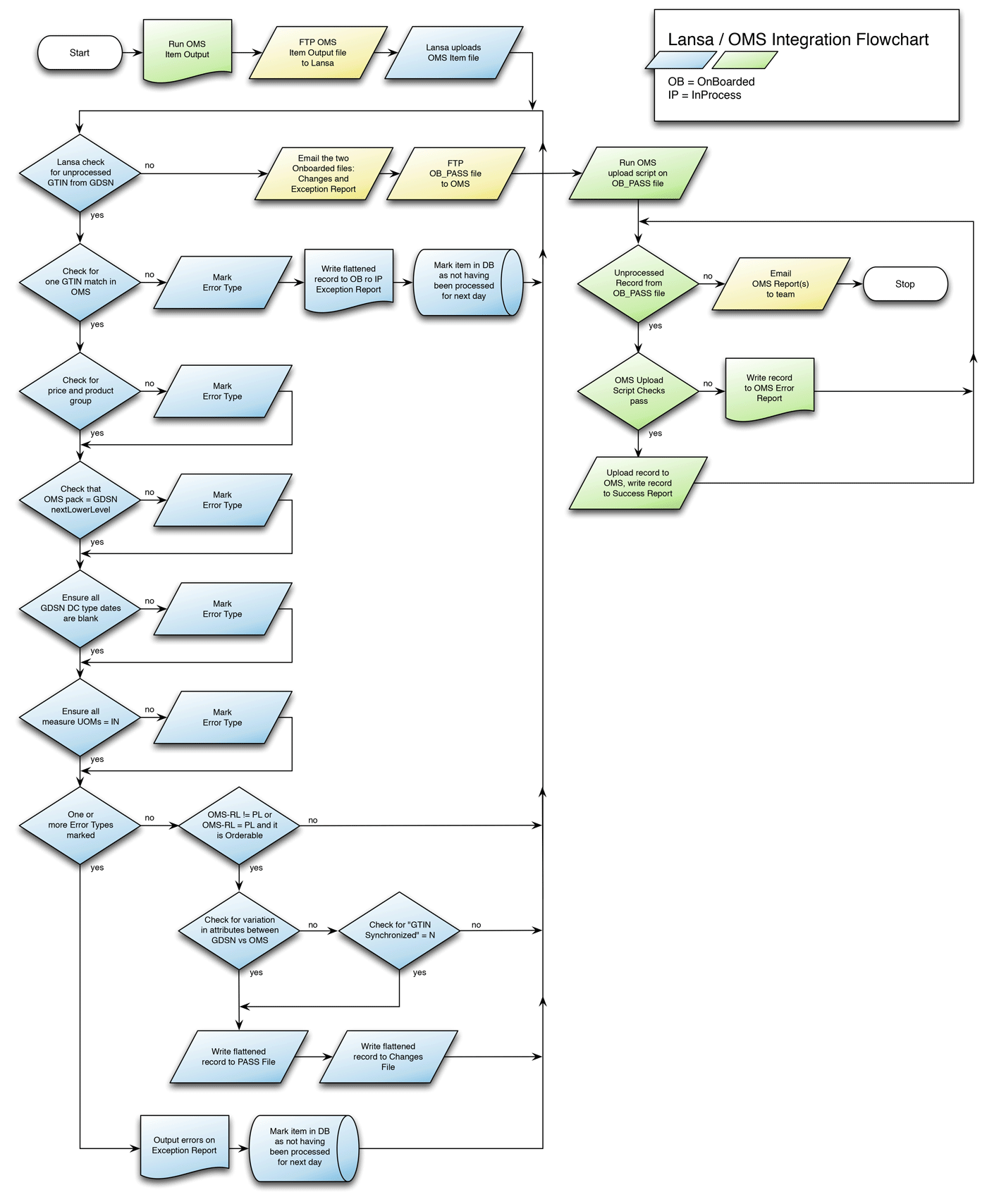
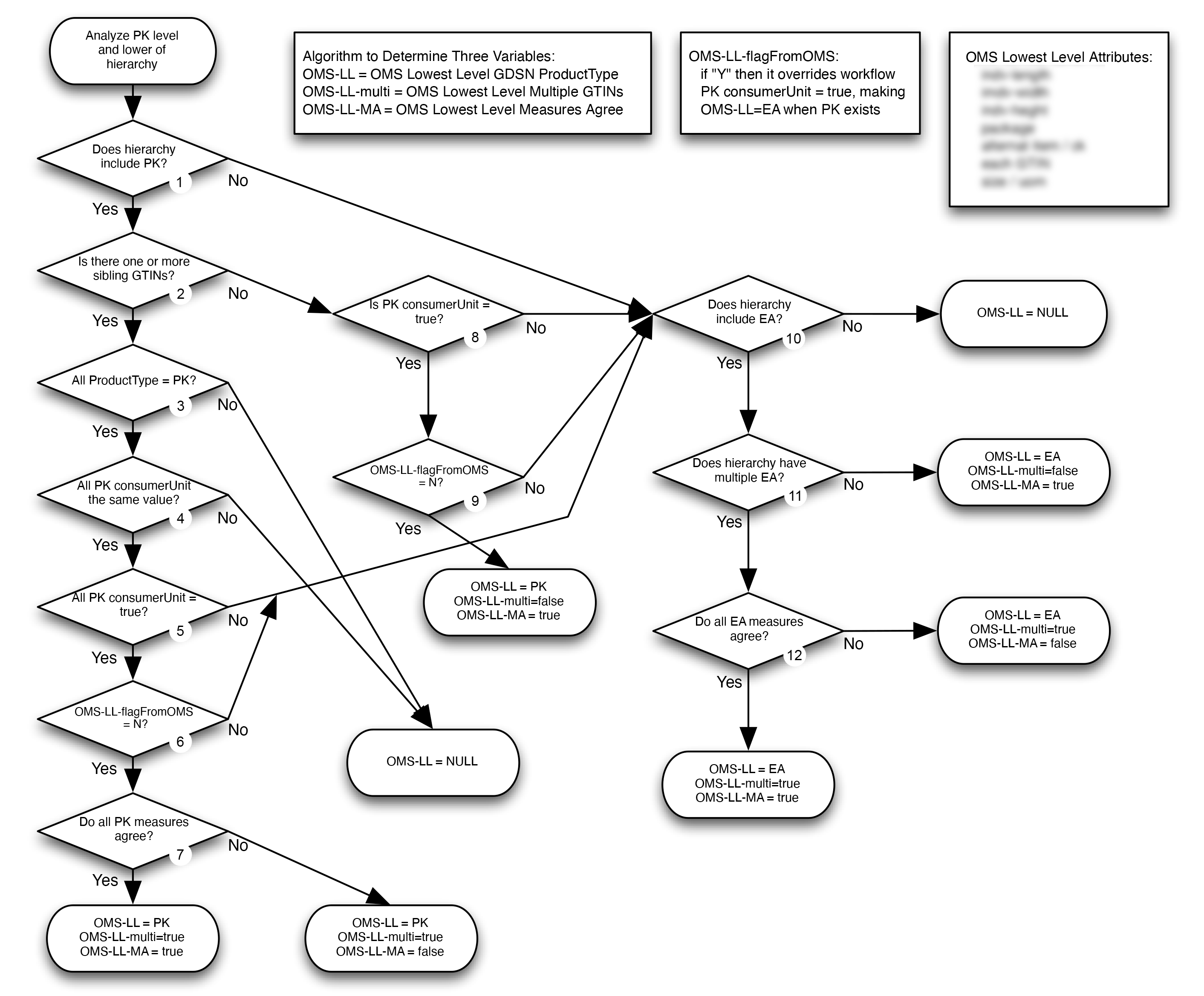
A challenging integration project required detailed documentation for our engineers who built the integration. I worked with the content experts to confirm all requirements and then created the flowcharts using OmniGraffle.
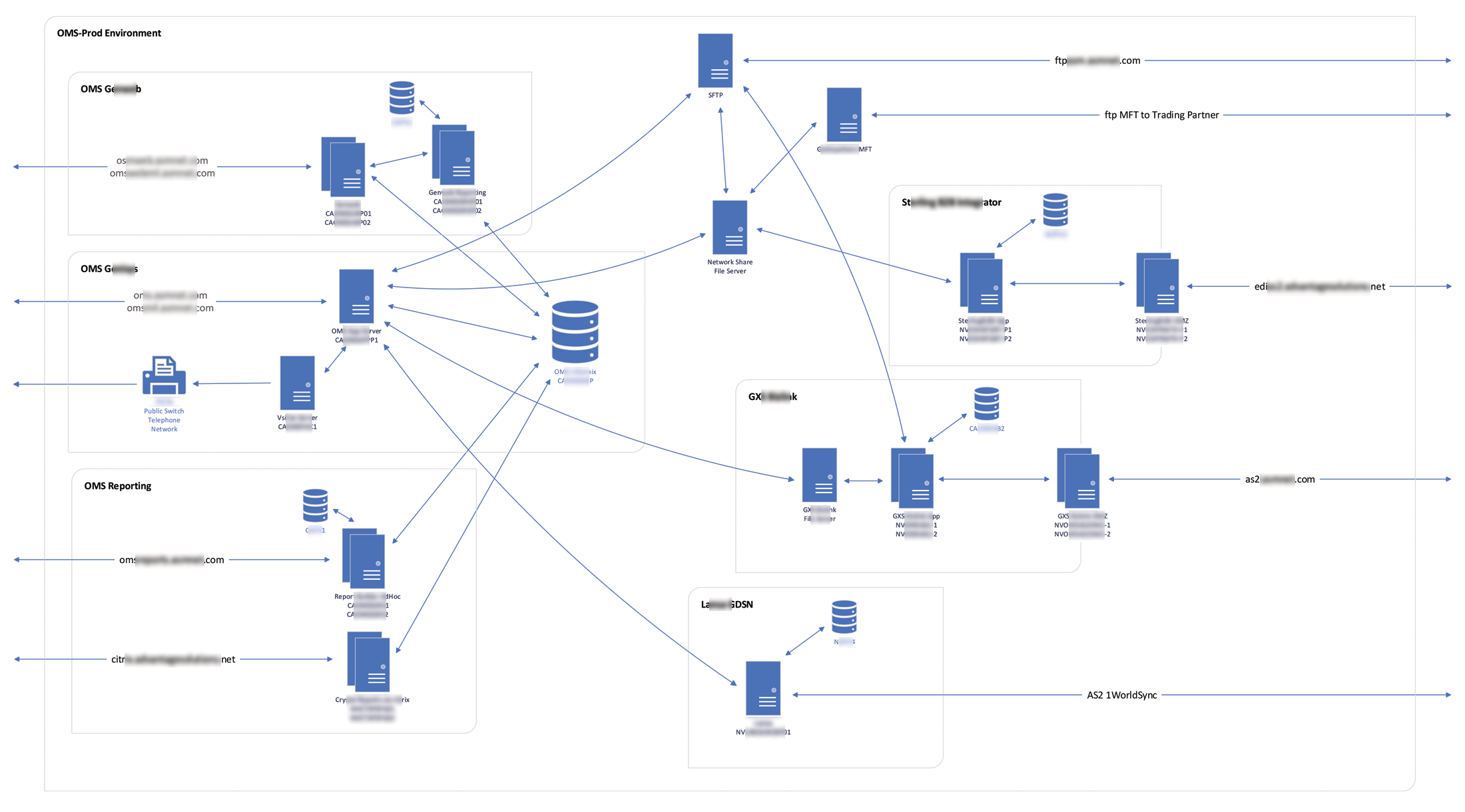
After significant changes, we needed an updated document of our network and systems dataflows. I worked with the platform managers and system owners to confirm all data flows and then created the diagram using Visio.
Web Application, a bootstrap-style resampling tool for DNA sequence data (PHP). Used to see how robust a tree/distance result is by re-running it on many random resamples of the original data.

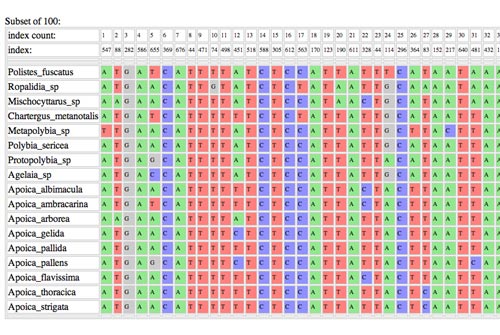
Results output in color coded table but also exported to .csv
Can't see the document?
Open in a new tab.
Journal Publication Source: wiley.com.
Created training materials for internal team members to learn how the GDSN (Global Data Synchonization Network) functions. It is a fundamental shift from the way we've worked with product descriptions historically and there weren't any good images to represent the strucural changes so I created some.
Can't see the document?
Open in a new tab.
An internal web application that checks an uploaded 945 EDI document against all of the company specification requirements. The requirements are listed below and the uploaded 945 will highlight errors with more detail on mouseover. Alternatively, a related 880 or 940 document can also be uploaded along with the 945 and the required data from the 945 will be highlighted on the 880/940 file or will show error and the requirement.
945 - Warehouse Shipping Advice
880 - Invoice File
940 - Warehouse Shipping Order
945 - Warehouse Shipping Advice
880 - Invoice File
940 - Warehouse Shipping Order